Web Development Career Guide: From Beginner to Job-Ready
October 28, 2026 · 6 min read
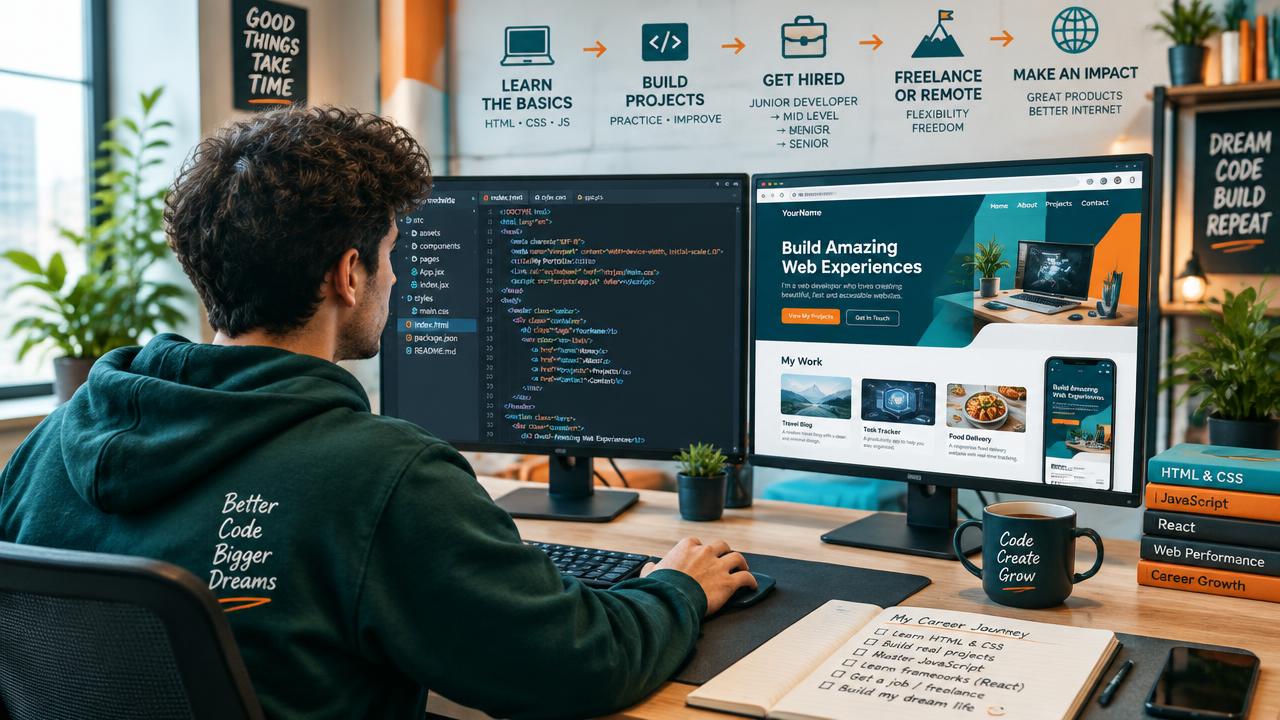
Web development is one of the few careers where you can start with nothing more than a laptop, an internet connection and curiosity. There is no single mandatory degree, no expensive equipment and no closed door you cannot open with skill and persistence. Yet many beginners feel lost. They watch random tutorials, jump between languages and never quite reach the point where they feel ready to apply for a job.
This guide is designed to fix that. It lays out a clear, step-by-step path from absolute beginner to job-ready web developer, explains the different roles available, and shows you how to build a portfolio, prepare for interviews and keep growing once you are hired.
What Does a Web Developer Actually Do?
Web developers design, build and maintain websites and web applications. On any given day, a developer might create a new page layout, fix a bug in a checkout process, connect a contact form to a database or improve how quickly a site loads on mobile devices.
The work generally falls into three broad roles:
- Front-end developers build everything users see and interact with: layouts, buttons, menus, animations and forms. They work mainly with HTML, CSS and JavaScript.
- Back-end developers handle the server, database and business logic behind the scenes. They use languages such as PHP, Python, Java or Node.js.
- Full-stack developers are comfortable with both sides and can build a complete application from start to finish.
You do not need to choose your final specialisation on day one. Most developers start with the fundamentals of both and naturally drift toward the area they enjoy most.
Stage 1: Learn the Core Building Blocks
Every web developer, regardless of specialisation, starts with the same three technologies.
HTML
HTML gives a web page its structure: headings, paragraphs, images, links and forms. It is simple to learn, but writing clean, semantic HTML is a skill that improves accessibility and search engine visibility.
CSS
CSS controls how pages look: colours, fonts, spacing and layouts. Focus on modern layout techniques such as flexbox and grid, and learn responsive design so your sites look great on phones, tablets and desktops.
JavaScript
JavaScript makes pages interactive. Learn variables, functions, arrays, objects, events and how to update the page dynamically. Later, you will learn to fetch data from servers and work with modern frameworks.
Expect to spend six to eight weeks on these fundamentals if you study consistently. Build small projects along the way, such as a personal profile page, a landing page or an interactive quiz.
Stage 2: Add a Back-End Language
Static pages are a great start, but real applications need to store and process data. This is where back-end development comes in. PHP is an excellent first back-end language because it is easy to set up, works naturally with HTML and powers a huge portion of the web.
During this stage, you will learn to handle form submissions, connect to a database, build login systems and protect your application from common security threats. Our complete PHP course for beginners roadmap breaks this stage into weekly milestones so you always know what to learn next.
Stage 3: Learn Databases
Almost every web application stores data: user accounts, products, blog posts, orders and messages. Learn the basics of relational databases with SQL, including how to design tables, write queries and connect them to your back-end code. Understanding how data is structured will make you a far stronger developer.
Stage 4: Master the Essential Tools
Professional developers rely on a set of tools that make their work faster and more reliable:
- Git and version control to track changes and collaborate with teams
- A code editor configured with helpful extensions
- Browser developer tools to inspect pages and debug problems
- The command line for running scripts and managing projects
- Deployment platforms to publish your work online
Learning Git early is particularly important. Almost every company uses it, and your public repositories become part of your portfolio.
Stage 5: Explore a Framework
Once you are comfortable with plain HTML, CSS, JavaScript and a back-end language, frameworks help you build larger applications faster. Front-end frameworks manage complex interfaces, while back-end frameworks provide structure for routing, databases and authentication.
The key is timing. Learn a framework only after you understand the fundamentals it is built on. Otherwise, you will struggle the moment something goes wrong.
Stage 6: Build a Portfolio That Gets Noticed
Your portfolio is your most powerful job-hunting tool. Recruiters and clients want proof that you can build real things. Aim for three to five quality projects rather than dozens of tiny exercises. Strong portfolio projects include:
- A business website with responsive design and a working contact form
- A database-driven application such as a blog, task manager or booking system with login
- An interactive front-end project like a weather dashboard that fetches live data
- A clone of a popular site, recreated with your own improvements
- A real project for a real person, such as a website for a local shop, friend or non-profit
For each project, write a short description explaining the problem, the technologies you used, the challenges you faced and what you learned. Host the code publicly and include a live link.
Stage 7: Prepare for Job Applications and Interviews
When your portfolio is ready, it is time to apply. Tailor your resume to highlight projects and skills rather than unrelated experience. Keep it to one page, and link to your portfolio and code repositories.
Technical interviews often include:
- Questions about HTML, CSS and JavaScript fundamentals
- A small coding challenge or take-home assignment
- Discussion of a project from your portfolio
- Problem-solving and communication questions
Practise explaining your projects out loud. Interviewers care as much about how you think and communicate as about the code itself.
Alternative Paths: Freelancing and Remote Work
A traditional job is not the only option. Many developers begin by freelancing, building websites for small businesses, fixing bugs or adding features to existing sites. Freelancing helps you gain real experience, earn income and grow your portfolio at the same time.
Remote work is also common in web development. Strong communication, reliability and a professional online presence will help you compete for remote roles anywhere in the world.
How Long Does It Take to Become Job-Ready?
With consistent study of around ten to fifteen hours per week, most learners become job-ready in six to twelve months. The exact timeline depends on your background, the quality of your learning resources and how much time you spend building projects.
The fastest learners are not necessarily the most talented. They are the most consistent. If you find it difficult to keep a regular routine, our article on effective study habits for online learners explains how to build learning habits that last.
Choosing Where to Learn
A structured course can save you months of trial and error. Look for a curriculum that is up to date, project-based and supported by mentors. Before enrolling, read our practical guide on how to choose the right online course so you can compare options with a clear checklist.
It also helps to understand where web development fits in the wider job market. Our overview of the top in-demand tech skills to learn in 2026 shows how web development combines with skills such as design, data and digital marketing to create even stronger career opportunities.
Keep Growing After You Are Hired
Getting your first job is a milestone, not the finish line. Technology evolves constantly, so successful developers keep learning. Read documentation, contribute to open-source projects, learn from code reviews and gradually explore advanced topics such as performance, accessibility, testing and security.
Every senior developer was once a beginner who refused to quit when the code would not work.
Final Thoughts
Becoming a web developer is a realistic, rewarding goal for anyone willing to learn step by step. Start with HTML, CSS and JavaScript, add a back-end language like PHP, learn databases and essential tools, explore a framework, and build a portfolio that proves your skills. Then apply confidently, keep improving and enjoy a career where you build things people use every day.
Keep reading
 Programming
PHP Course for Beginners: A Complete Roadmap to Start Coding in 2026
Everything you need to know before starting PHP: what to learn, how long it takes, common mistakes and where PHP can take your career.
Read article Careers
Top 10 In-Demand Tech Skills to Learn in 2026
From web development and AI to cloud and cybersecurity, discover the tech skills employers want most and how to start learning them.
Read article Learning
How to Choose the Right Online Course for Your Career Goals
A practical 9-step framework to compare syllabuses, instructors, projects and certificates so you pick a course you will actually finish.
Read article